< November 2008 | December 2008 | January 2009 >

December 19, 2008

明示的に実装されたインターフェースメンバにバインディングする

C# では、インターフェースを明示的に実装することができます。

たとえばこんなインターフェース

namespace SampleApp
{
    public interface IProfile
    {
        string Name { get; }
        DateTime BirthDay { get; }
    }
}

実装先で、インターフェース名をつけてメンバを定義します。この Window1 は IProfile にキャストしないと BirthDay は参照できません。また、Window1.Name と ((IProfile) Window1).Name は、戻される値が異なります。

namespace SampleApp
{
    /// <summary>
    /// Window1.xaml の相互作用ロジック
    /// </summary>
    public partial class Window1 : Window, IProfile
    {
        private DateTime birthDay;
        public Window1 ()
        {
            birthDay = DateTime.Now;
            InitializeComponent ();
        }

        #region IProfile メンバ

        string IProfile.Name
        {
            get { return this.GetType ().ToString (); }
        }

        DateTime IProfile.BirthDay
        {
            get { return birthDay; }
        }

        #endregion
    }
}

このプロパティにデータバインドする方法がわからなくてはまりました。XAML では、以下のように Path プロパティを丸括弧でくくって、インターフェース名.メンバ名として指定します。

<Window
    x:Name="OwnerWindow"
    x:Class="SampleApp.Window1"
    xmlns="http://schemas.microsoft.com/winfx/2006/xaml/presentation"
    xmlns:local="clr-namespace:SampleApp"
    xmlns:x="http://schemas.microsoft.com/winfx/2006/xaml">
    <Grid>
        <Grid.ColumnDefinitions>
            <ColumnDefinition Width="Auto"/>
            <ColumnDefinition Width="Auto"/>
        </Grid.ColumnDefinitions>
        <Grid.RowDefinitions>
            <RowDefinition Height="Auto"/>
            <RowDefinition Height="Auto"/>
        </Grid.RowDefinitions>
        <TextBlock Grid.Column="0" Grid.Row="0" Text="なまえ: "/>
        <TextBlock Grid.Column="1" Grid.Row="0" Text="{Binding ElementName=OwnerWindow, Path=(local:IProfile.Name)}"/>
        <TextBlock Grid.Column="0" Grid.Row="1" Text="たんじょうび: "/>
        <TextBlock Grid.Column="1" Grid.Row="1" Text="{Binding ElementName=OwnerWindow, Path=(local:IProfile.BirthDay)}"/>
    </Grid>
</Window>
続きを読む...

December 12, 2008

メインメソッドを自分で定義する

Visual Studio で WPF アプリケーションを作成してコンパイルすると、App.g.cs 内で Main メソッドが生成されます。こんなの。

// App.g.cs
#pragma checksum "..\..\App.xaml" "{406ea660-64cf-4c82-b6f0-42d48172a799}" "3881E2E4C260EDC7BB1C4D1502197442"
//------------------------------------------------------------------------------
// <auto-generated>
//     このコードはツールによって生成されました。
//     ランタイム バージョン:2.0.50727.3053
//
//     このファイルへの変更は、以下の状況下で不正な動作の原因になったり、
//     コードが再生成されるときに損失したりします。
// </auto-generated>
//------------------------------------------------------------------------------

using System;
// 中略・・・


namespace SampleApp {
    
    
    /// <summary>
    /// App
    /// </summary>
    public partial class App : System.Windows.Application {
        
        // 中略・・・
        
        /// <summary>
        /// Application Entry Point.
        /// </summary>
        [System.STAThreadAttribute()]
        [System.Diagnostics.DebuggerNonUserCodeAttribute()]
        public static void Main() {
            SampleApp.App app = new SampleApp.App();
            app.InitializeComponent();
            app.Run();
        }
    }
}

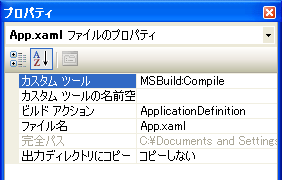
でも、自分で Main メソッドを定義したい時ってありますよね。App.g.cs は App.xaml を元に生成されますが、この App.xaml のビルド アクションは、デフォルトでは以下のように "ApplicationDefinition" が設定されています。

app.xaml.png

でも、自分で Main メソッドを定義したい時ってありますよね。App.g.cs は App.xaml を元に生成されますが、この App.xaml のビルド アクションは、デフォルトでは以下のように "ApplicationDefinition" が設定されています。正しい方法なのかは知りませんが、これを他のウインドウと同じように、"Page" を設定すると Main メソッドが生成されなくなります。あるいは、Resource とかでもいいのかも。

December 11, 2008

定義済み色名

System.Windows.Media.Colors クラスSystem.Windows.Media.Brushes クラスには、それぞれ静的プロパティとして定義済みの色・ブラシを持っています。でも msdn のドキュメントでは、一覧がイメージになっていて非常に使いにくい…。テキストベースにしてほしいなー、というわけで、取り急ぎ HTML 化してみました。色名とカラーコードとの対応は HTML のものと同じはずですが、ブラウザでの色の再現方法が異なるかもなので、参考程度で。

続きを読む...

メモ: HTTP/1.1 Reason phrase

RFC 2616 の 6.1.1 Status Code and Reason Phrase がオリジナルということになるのかしら ?

Status-Code =
  "100"  ; Section 10.1.1: Continue
| "101"  ; Section 10.1.2: Switching Protocols
| "200"  ; Section 10.2.1: OK
| "201"  ; Section 10.2.2: Created
| "202"  ; Section 10.2.3: Accepted
| "203"  ; Section 10.2.4: Non-Authoritative Information
| "204"  ; Section 10.2.5: No Content
| "205"  ; Section 10.2.6: Reset Content
| "206"  ; Section 10.2.7: Partial Content
| "300"  ; Section 10.3.1: Multiple Choices
| "301"  ; Section 10.3.2: Moved Permanently
| "302"  ; Section 10.3.3: Found
| "303"  ; Section 10.3.4: See Other
| "304"  ; Section 10.3.5: Not Modified
| "305"  ; Section 10.3.6: Use Proxy
| "307"  ; Section 10.3.8: Temporary Redirect
| "400"  ; Section 10.4.1: Bad Request
| "401"  ; Section 10.4.2: Unauthorized
| "402"  ; Section 10.4.3: Payment Required
| "403"  ; Section 10.4.4: Forbidden
| "404"  ; Section 10.4.5: Not Found
| "405"  ; Section 10.4.6: Method Not Allowed
| "406"  ; Section 10.4.7: Not Acceptable
| "407"  ; Section 10.4.8: Proxy Authentication Required
| "408"  ; Section 10.4.9: Request Time-out
| "409"  ; Section 10.4.10: Conflict
| "410"  ; Section 10.4.11: Gone
| "411"  ; Section 10.4.12: Length Required
| "412"  ; Section 10.4.13: Precondition Failed
| "413"  ; Section 10.4.14: Request Entity Too Large
| "414"  ; Section 10.4.15: Request-URI Too Large
| "415"  ; Section 10.4.16: Unsupported Media Type
| "416"  ; Section 10.4.17: Requested range not satisfiable
| "417"  ; Section 10.4.18: Expectation Failed
| "500"  ; Section 10.5.1: Internal Server Error
| "501"  ; Section 10.5.2: Not Implemented
| "502"  ; Section 10.5.3: Bad Gateway
| "503"  ; Section 10.5.4: Service Unavailable
| "504"  ; Section 10.5.5: Gateway Time-out
| "505"  ; Section 10.5.6: HTTP Version not supported
| extension-code
extension-code
= 3DIGIT
Reason-Phrase
= *<TEXT, excluding CR, LF>

December 10, 2008

メモ: プログラミング上の操作の英語での表現

Programming Concepts Compared in Different Languages with Code Examples

コンテンツそのものは言語の比較なんだけど…、例文が付いてるので、おぼろげながら何のことを言っているのかわかります。

MS にフィードバック投げたりするときに、表現の参考になるかも。

Assignment Statements
代入文かな?
Comments
コメント
Conditional Statements
評価、判断
Declaring Variables
変数宣言
FOR Loops
FOR ループ
Hiding Base Class Members
基本クラスメンバの隠蔽
Initializing Value Types
初期化
Parameter Passing by Reference
引数の参照渡し
Parameter Passing by Value
引数の値渡し
Selection Statements
選択文 (switch 文)
Set an Object Reference to Nothing
オブジェクト参照の無効化
Structured Exception Handling
構造化例外処理
WHILE Loops
WHILE ループ