tolerance
- [語彙]
しきい値、許容誤差。
#ifndef __INPUTBOX__H
#define __INPUTBOX__H

int InputBox (HWND hWnd, LPCTSTR lpText, LPCTSTR lpCaption, LPTSTR lpszBuffer, DWORD dwBufferSize);

#endif    //__INPUTBOX__H
#include <windows.h>
#include <tchar.h>
#include "resource.h"
#include "inputbox.h"

typedef struct InputBoxParam
{
    LPCTSTR lpszTitle;
    LPCTSTR lpszPrompt;
    LPTSTR lpszBuffer;
    DWORD cBuffer;
} INPUTBOXPARAM, *LPINPUTBOXPARAM;


INT_PTR CALLBACK DialogProc (HWND hwndDlg, UINT uMsg, WPARAM wParam, LPARAM lParam)
{
    UINT len = 0;
    LPINPUTBOXPARAM pParam = NULL;

    switch (uMsg)
    {
    case WM_INITDIALOG:
        if (lParam)
        {
            pParam = reinterpret_cast <LPINPUTBOXPARAM> (lParam);
            SetWindowText (hwndDlg, pParam->lpszTitle);
            SetDlgItemText (hwndDlg, IDC_STATIC_PROMPT, pParam->lpszPrompt);
            SetDlgItemText (hwndDlg, IDC_EDIT_INPUTBOX, pParam->lpszBuffer);
            SetProp (hwndDlg, _T ("InputBoxParam"), reinterpret_cast <HANDLE> (lParam));
        }
        break;

    case WM_COMMAND:
        switch (LOWORD (wParam))
        {
        case IDOK:
            pParam = reinterpret_cast <LPINPUTBOXPARAM> (GetProp (hwndDlg, _T ("InputBoxParam")));
            if (pParam)
            {
                len = GetDlgItemText (hwndDlg, IDC_EDIT_INPUTBOX, pParam->lpszBuffer, pParam->cBuffer);
            }
            EndDialog (hwndDlg, len);
            break;

        case IDCANCEL:
            EndDialog (hwndDlg, 0);
            break;

        case IDC_EDIT_INPUTBOX:
            {
                WORD notify = HIWORD (wParam);
                if (EN_SETFOCUS == notify)
                {
                    HWND hControl = GetDlgItem (hwndDlg, IDC_EDIT_INPUTBOX);
                    SendMessage (hControl, EM_SETSEL, (WPARAM) 0, (LPARAM) -1);
                }
            }
            break;
        default:
            break;
        }
        break;
    }
    return 0;
}

int InputBox (HWND hWnd, LPCTSTR lpText, LPCTSTR lpCaption, LPTSTR lpszBuffer, DWORD dwBufferSize)
{
    INPUTBOXPARAM Param;
    ZeroMemory (&Param, sizeof (INPUTBOXPARAM));
    Param.lpszTitle = lpCaption;
    Param.lpszPrompt = lpText;
    Param.lpszBuffer = lpszBuffer;
    Param.cBuffer = dwBufferSize;

    INT_PTR result = DialogBoxParam ((HINSTANCE) GetModuleHandle (NULL), (LPCTSTR) IDD_INPUTBOX, NULL, DialogProc, reinterpret_cast<LPARAM> (&Param));

    return result;
}
/////////////////////////////////////////////////////////////////////////////
//
// Dialog
//

IDD_INPUTBOX DIALOGEX 0, 0, 274, 62
STYLE DS_SETFONT | DS_MODALFRAME | DS_FIXEDSYS | WS_POPUP | WS_CAPTION | WS_SYSMENU
CAPTION "Dialog"
FONT 8, "MS Shell Dlg", 400, 0, 0x1
BEGIN
    DEFPUSHBUTTON   "OK",IDOK,203,7,64,14
    PUSHBUTTON      "キャンセル",IDCANCEL,203,23,64,14
    LTEXT           "スタティック",IDC_STATIC_PROMPT,7,7,191,30
    EDITTEXT        IDC_EDIT_INPUTBOX,7,43,260,12,ES_AUTOHSCROLL
END
//{{NO_DEPENDENCIES}}
// Microsoft Visual C++ generated include file.
// Used by getpath.rc
//
#define IDD_INPUTBOX                    101
#define IDC_STATIC_PROMPT               1001
#define IDC_EDIT_INPUTBOX               1002

// Next default values for new objects
//
#ifdef APSTUDIO_INVOKED
#ifndef APSTUDIO_READONLY_SYMBOLS
#define _APS_NEXT_RESOURCE_VALUE        102
#define _APS_NEXT_COMMAND_VALUE         40001
#define _APS_NEXT_CONTROL_VALUE         1003
#define _APS_NEXT_SYMED_VALUE           101
#endif
#endif
public class Dump
{
    private byte[] _source;

    #region コンストラクタ

    public Dump (string source)
    {
        _source = Encoding.Default.GetBytes (source);
    }
    public Dump (byte [] source)
    {
        _source = source;
    }
    public Dump (double source)
    {
        _source = BitConverter.GetBytes (source);
    }
    public Dump (float source)
    {
        _source = BitConverter.GetBytes (source);
    }
    public Dump (ulong source)
    {
        _source = BitConverter.GetBytes (source);
    }
    public Dump (uint source)
    {
        _source = BitConverter.GetBytes (source);
    }
    public Dump (ushort source)
    {
        _source = BitConverter.GetBytes (source);
    }
    public Dump (long source)
    {
        _source = BitConverter.GetBytes (source);
    }
    public Dump (int source)
    {
        _source = BitConverter.GetBytes (source);
    }
    public Dump (short source)
    {
        _source = BitConverter.GetBytes (source);
    }
    public Dump (char source)
    {
        _source = BitConverter.GetBytes (source);
    }
    public Dump (bool source)
    {
        _source = BitConverter.GetBytes (source);
    }
    #endregion


    public void Write ()
    {
        Console.WriteLine ("     +0 +1 +2 +3 +4 +5 +6 +7 +8 +9 +A +B +C +D +E +F 0123456789ABCDEF");
        StringBuilder builder = new StringBuilder ();
        for (int i = 0; i < _source.Length; i++)
        {
            if ((i % 16) == 0)
            {
                if (i != 0)
                {
                    Console.Write (builder.ToString ());
                    var ascii = _source.Skip (i - 16).Take (16).Select (b => b < (byte) 0x20 ? (byte) 0x2e : b).ToArray ();
                    Console.WriteLine (Encoding.Default.GetString (ascii));
                }
                builder = new StringBuilder ();
                builder.AppendFormat ("{0:X4} ", i);
            }
            builder.AppendFormat ("{0:X2} ", _source [i]);
        }
        var remain = _source.Length % 16;
        if (remain != 0)
        {
            Console.Write ("{0,-53}", builder.ToString ());
            var ascii = _source.Skip (_source.Length - remain).Take (remain).Select (b => b < (byte) 0x20 ? (byte) 0x2e : b).ToArray ();
            Console.WriteLine (Encoding.Default.GetString (ascii));
        }
    }
}
ジェネリックな環状キューを作ってます。改善点はいろいろありますが、System.Collection.Generic.Queue(T) クラスとメンバ名の同期が取れていないのが一番の改善点でしょうか。なんとなく、ATL の std::queue のほうが頭にあったため、中途半端に混ざってます。
詳細とか改善とか、また書きます (多分)
/// <summary>
/// 環状キュークラス
/// </summary>
/// <typeparam name="TSource">キューの要素</typeparam>

public class RingQueue<TSource> : IRingQueue<TSource>
{
    protected List<TSource> _collection;
    protected int _currentPos = 0;


    /// <summary>
    /// コンストラクタ
    /// </summary>

    public RingQueue ()
    {
        _collection = new List<TSource> ();
        _currentPos = -1;
    }


    /// <summary>
    /// コンストラクタ
    /// </summary>
    /// <param name="collection">新しい RingQueue(T) にコピーする要素のコレクション</param>

    public RingQueue (IEnumerable<TSource> collection)
    {
        _collection = new List<TSource> (collection);
    }


    #region IRingQueue<TSource> メンバ

    /// <summary>
    /// キューに要素を追加する。
    /// </summary>
    /// <param name="item">追加する要素</param>

    public void Push (TSource item)
    {
        lock (_collection)
        {
            //HACK: ゼロを判断しなくてよくならないか?
            var count = _collection.Count;
            if (count == 0)
            {
                _collection.Add (item);
                _currentPos = 0;
            }
            else
            {
                var insertPos = (_currentPos + count - 1) % count + 1;
                _collection.Insert (insertPos, item);
                _currentPos = (insertPos + 1) % _collection.Count;
            }
        }
    }


    /// <summary>
    /// RingQueue(T) の現在の要素を削除して返す。
    /// </summary>
    /// <returns>RingQueue(T) 現在の要素</returns>

    public TSource Pop ()
    {
        lock (_collection)
        {
            //HACK: 要素がない場合の例外が何が返るか確認のこと。適切でなければ再スローすること。
            var item = Peek ();
            _collection.RemoveAt (_currentPos);
            if (_collection.Count == 0)
                _currentPos = -1;
            else
                _currentPos = _currentPos % _collection.Count;
            return item;
        }
    }


    /// <summary>
    /// RingQueue(T) の現在の要素を削除せずに返す。
    /// </summary>
    /// <returns>RingQueue(T) 現在の要素</returns>

    public TSource Peek ()
    {
        //HACK: 要素がない場合の例外が何が返るか確認のこと。適切でなければ再スローすること。
        return _collection [_currentPos];
    }


    /// <summary>
    /// RingQueue(T) を次の要素に進める。
    /// </summary>

    public void MoveNext ()
    {
        if (IsEmpty)
            throw new InvalidOperationException ("キューに要素がありません。");
        _currentPos = (_currentPos + 1) % _collection.Count;
    }


    /// <summary>
    /// RingQueue(T) からすべての要素を削除する。
    /// </summary>

    public void Clear ()
    {
        _collection.Clear ();
        _currentPos = -1;
    }


    /// <summary>
    /// RingQueue(T) に格納されている要素の数を取得する。
    /// </summary>

    public int Count
    {
        get { return _collection.Count; }
    }


    /// <summary>
    /// RingQueue(T) が空かどうかを示す値を取得する。
    /// </summary>

    public bool IsEmpty
    {
        get { return _collection.Count == 0; }
    }

    #endregion


    /// <summary>
    /// 指定したコレクションの要素を RingQueue(T) の末尾に追加する。
    /// </summary>
    /// <param name="collection">追加する要素を含むコレクション</param>

    public void PushRange (IEnumerable<TSource> collection)
    {
        lock (_collection)
        {
            //HACK: ゼロを判断しなくてよくならないか?
            var count = _collection.Count;
            if (count == 0)
            {
                _collection.AddRange (collection);
                _currentPos = 0;
            }
            else
            {
                var addCount = collection.Count ();
                var insertPos = (_currentPos + count - 1) % count + 1;
                _collection.InsertRange (insertPos, collection);
                _currentPos = (insertPos + addCount) % _collection.Count;
            }
        }
    }

    #region IEnumerable<TSource> メンバ

    /// <summary>
    /// RingQueue(T) を反復処理する列挙子を返す。
    /// </summary>
    /// <returns>コレクションの列挙子</returns>

    public IEnumerator<TSource> GetEnumerator ()
    {
        return _collection.Skip (_currentPos).Concat (_collection.Take (_currentPos)).GetEnumerator ();
    }

    #endregion

    #region IEnumerable メンバ

    /// <summary>
    /// RingQueue(T) を反復処理する列挙子を返す。
    /// </summary>
    /// <returns>コレクションの列挙子</returns>

    System.Collections.IEnumerator System.Collections.IEnumerable.GetEnumerator ()
    {
        return GetEnumerator ();
    }

    #endregion
}
プロパティのデリゲート欲しい人ー !! みんな欲しくないのー !? 欲しいよねー !?
主に GUI にかかわるプロパティを別スレッドから操作したい場合だと思うんだけど、プロパティ更新するだけのメソッドを用意したりして、なんだかなぁと。試しに以下のように Person クラスを作って、そのメンバを調べてみた。
namespace TestProgram
{
    class Person
    {
        public string Name { get; set; }
        public int Age { get; set; }
        public void SayHallo (Person you)
        {
            // 君に挨拶するよ !
            Console.WriteLine (string.Format ("Hello ! {0}, I am {1};", you.Name, this.Name));
        }
    }

    class Test
    {
        static void Main (string [] args)
        {
            var personType = typeof (Person);
            foreach (var member in personType.GetMembers ())
            {
                Console.WriteLine (string.Format ("{0,-12} {1,-24} {2,-12}", member.Name, member.DeclaringType, member.MemberType));
            }
        }
    }
}
実行結果はこんな感じ。へっへ、欲しいもん、ありましたぜダンナ。
get_Name     TestProgram.Person       Method
set_Name     TestProgram.Person       Method
get_Age      TestProgram.Person       Method
set_Age      TestProgram.Person       Method
SayHallo     TestProgram.Person       Method
ToString     System.Object            Method
Equals       System.Object            Method
GetHashCode  System.Object            Method
GetType      System.Object            Method
.ctor        TestProgram.Person       Constructor
Name         TestProgram.Person       Property
Age          TestProgram.Person       Property
続行するには何かキーを押してください . . .
さらに、メソッドの宣言を取得してみた。
static void Main (string [] args)
{
    var personType = typeof (Person);
    foreach (var member in personType.GetMembers ())
    {
        //Console.WriteLine (string.Format ("{0,-12} {1,-24} {2,-12}", member.Name, member.DeclaringType, member.MemberType));
        if (member.MemberType == System.Reflection.MemberTypes.Method)
        {
            var method = personType.GetMethod (member.Name);
            if (method != null)
                Console.WriteLine (string.Format ("{0}", method.GetBaseDefinition ()));
        }
    }
}
実行結果。
System.String get_Name()
Void set_Name(System.String)
Int32 get_Age()
Void set_Age(Int32)
Void SayHallo(TestProgram.Person)
System.String ToString()
Boolean Equals(System.Object)
Int32 GetHashCode()
System.Type GetType()
続行するには何かキーを押してください . . .
なので、プロパティの型と名称が分かれば、こんな拡張メソッドでプロパティのデリゲートが作成できますね。
public static class DelegateExtention
{
    public static Action<TValue> CreatePropertySetDelegate<TValue> (this object obj, string propertyName)
    {
        return Delegate.CreateDelegate (typeof (Action<TValue>), obj, "set_" + propertyName) as Action<TValue>;
    }

    public static Func<TValue> CreatePropertyGetDelegate<TValue> (this object obj, string propertyName)
    {
        return Delegate.CreateDelegate (typeof (Func<TValue>), obj, "get_" + propertyName) as Func<TValue>;
    }
}
DoEvents っていうと、VB6 時代に使ったなーとか妙に懐かしいです。C とか C++ だとこんな実装をしてました。
void DoEvents (void)
{
    MSG msg;

    while (PeekMessage (&msg, NULL, 0, 0, PM_REMOVE))
    {
        TranslateMessage (&msg);
        DispatchMessage (&msg);
    }
}
要するに、メインのメッセージループの内側で、同期的にメッセージループを実行してメッセージキュー内にたまってるメッセージを捌かせるもので、主に同期処理の合間に GUI が固まらないようにする目的で使うやつです。Borland 系では Application->ProcessMessages () がおんなじ様な実装になってたんだと思います。多分。
WPF では DispatcherFrame クラスがメッセージループを表わすらしく、Dispatcher.PushFrame でそれを実行できます。たまってたメッセージを処理し終えた際にループを終了する必要がありますが、ディスパッチスレッドに優先度の低い処理としてメッセージループの終了を登録しておくことで実現します。
実際の実装方法は MSDN のあちこちにありますが、関数一個にした版をとりあえず上げときます。
/// <summary>
/// 現在メッセージ待ち行列の中にある全てのUIメッセージを処理します。
/// </summary>

public static void DoEvents ()
{
    // うちっかわの DispatcherFrame を作成
    var nestedFrame = new DispatcherFrame ();

    // DispatcherFrame (= 実行ループ) を終了させるコールバック
    DispatcherOperationCallback callback = (frame) => { ((DispatcherFrame) frame).Continue = false; return null;

    // 非同期で実行する
    // 優先度を Background にしているので、このコールバックは
    // ほかに処理するメッセージがなくなったら実行される
    var operation = Dispatcher.CurrentDispatcher.BeginInvoke (DispatcherPriority.Background, callback, nestedFra

    // うちっかわの実行ループを開始する
    Dispatcher.PushFrame (nestedFrame);

    // コールバックのオペレーションが完了していない場合、強制終了する
    if (operation.Status != DispatcherOperationStatus.Completed)
    {
        operation.Abort ();
    }
}
// InvalidOperationException "シーケンスに要素が含まれていません" となる
var s1 = Enumerable.Empty<string> ().Aggregate ((work, next) => work + "," + next);

// これは大丈夫
var s2 = Enumerable.Repeat ("a", 1).Aggregate ((work, next) => work + "," + next);
XmlSerializer って、実行時に Csc.exe 起動するってこと ? また見ておこう…。
訳してから気付いたけど、日本語あったw
http://support.microsoft.com/kb/903204/ja
XMLSerializer クラスを使用した .NET Framework ベースのアプリケーションを、アジア版の Windows XP 上で実行すると応答を停止します。
Important This article contains information about how to modify the registry. Make sure to back up the registry before you modify it. Make sure that you know how to restore the registry if a problem occurs. For more information about how to back up, restore, and modify the registry, click the following article number to view the article in the Microsoft Knowledge Base:
重要 この記事はレジストリの修正方法についての情報を含みます。レジストリの修正前には必ずバックアップを行ってください。問題が発生した場合にレジストリを回復する方法を確認しておいてください。レジストリをバックアップ、リストア、修正する方法について、詳しくは Microsoft サポート技術情報の記事を参照するために以下の記事番号をクリックしてください。
256986 Description of the Microsoft Windows registry
SYMPTOMS
現象When a Microsoft .NET Framework-based application tries to create an instance of the XMLSerializer class, the application stops responding. This symptom occurs if you try to run the application on a computer that is running an Asian version of Microsoft Windows XP.
Microsoft .NET Framework ベースのアプリケーションで XMLSerializer クラスのインスタンスを作ろうとすると、アプリケーションが応答を停止します。この現象は、アプリケーションをアジア版の Microsoft Windows XP 上で実行した際に発生します。
Note This article pertains to a specific scenario in which this symptom occurs. There are other scenarios in which this symptom may also occur. For example, this symptom may occur when one process starts another process in non-Asian versions of Windows XP.
注 この記事はこの現象が発生する特定のシナリオに関するものです。この現象が発生するかもしれない別のシナリオもあります。例えば、アジア以外のバージョンの Windows XP 上で一つのプロセスが別のプロセスを開始する場合にもこの現象が起こるかもしれません。
CAUSE
原因The XMLSerializer class performs dynamical compilation. During dynamical compilation, the Csc.exe process is started. In turn, the Csc.exe process starts the Conime.exe process on Asian versions of Windows XP.
XMLSerializer クラスは動的コンパイルを実行します。動的コンパイル中、Csc.exe プロセスが開始されます。そして、アジア版の Windows XP 上では、Csc.exe プロセスは Conime.exe プロセスを起動します。
The issue that is described in the "Symptoms" section occurs because of a deadlock condition in the Csc.exe process. Specifically, one thread (thread A) acquires a lock that is required by another thread (thread B). Therefore, thread B tries to start the Conime.exe process. By default, the Conime.exe process is loaded whenever a command prompt starts on Asian versions of Windows XP. Thread B waits 10 minutes while it tries to acquire the lock. After 10 minutes, this thread times out.
"現象" のセクションに記述した問題は、Csc.exe プロセスのデッドロック状態により発生します。具体的には、ひとつのスレッド (スレッド A) が別のスレッド (スレッド B) が必要とするロックを取得します。したがって、スレッド B は Conime.exe プロセスを開始しようとします。デフォルトでは、アジア版の Windows XP では Conime.exe プロセスはコマンドプロンプトが開始されるたびにロードされます。スレッド B はそのロックの取得を試行して 10 分間待機し、10分後、そのスレッドはタイムアウトします。
Note For more information, visit the following MSDN Web site:
注 詳しい情報は、以下の MSDN のウェブサイトへ:
http://msdn2.microsoft.com/en-us/library/ms971336.aspx
RESOLUTION
解決方法Warning Serious problems might occur if you modify the registry incorrectly by using Registry Editor or by using another method. These problems might require that you reinstall your operating system. Microsoft cannot guarantee that these problems can be solved. Modify the registry at your own risk.
To resolve this issue, make sure that the Conime.exe process starts at the system startup. To do this, follow these steps:警告 レジストリエディタやその他の方法でレジストリを誤って変更すると、深刻な問題が発生します。それによってオペレーティングシステムの再インストールが必要となる可能性があります。Microsoft はそれらの問題の解決を保障できません。あなた自身の責任でレジストリの変更を行ってください。
この件を解決するには、システムの開始時に Conime.exe プロセスを必ず開始します。そのためには、以下の手順を行ってください。
- Click Start, click Run, type regedit in the Open box, and then click OK.
スタートメニューをクリックして、ファイル名を指定して実行をクリック、名前ボックスに regedit と入力して OK をクリックしてください。- Locate and then click the following key in the registry:
HKEY_LOCAL_MACHINE\SOFTWARE\Microsoft\Windows\CurrentVersion\Run
レジストリ内の以下のキーを見つけてクリックしてください:
HKEY_LOCAL_MACHINE\SOFTWARE\Microsoft\Windows\CurrentVersion\Run- In the right pane, right-click the blank space, and then click New. Click String Value, type conime as the name, and then press ENTER.
右ペイン内の空白の部分を右クリックし、新規をクリックしてください。文字列値をクリックして、名前を conime として ENTER キーを押してください。- Right-click conime, and then click Modify.
conime を右クリックして修正をクリックしてください。- In the Edit String dialog box, type %windir%\system32\conime.exe under Value data, and then click OK.
文字列の編集ダイアログボックスで、値のデータに %windir%\system32\conime.exe と入力して OK をクリックしてください。- Quit Registry Editor.
レジストリエディタを終了してください。MORE INFORMATION
追加情報Input Method Editors (IMEs) are DLL files that let users type complex ideographic characters by using a standard keyboard. IMEs are available in Asian versions of Windows. IMEs simplify the process by which users enter text that contains characters from Unicode and double-byte character set (DBCS) formats. IMEs monitor the user's keystrokes, anticipate the character the user may want, and present a list of character options from which to select.
Input Method Editor (IME) はユーザーに標準キーボードを使用して複雑な表意文字を入力させる DLL ファイルです。IME はアジア版 Windows で利用されます。IME はユーザーがユニコードおよび 2 バイト文字セット (DBCS) フォーマットの文字を含むテキストを入力するプロセスを単純化します。IME はユーザーのキー入力を監視して、ユーザーが希望すると思われる文字を予測し、文字を選択するためのリストを提供します。
The problem that is described in the "Symptoms" section is known to occur in the following third-party programs:
"現象" セクションに記された問題は以下のサードパーティ製プログラムで発生することが知られています。
- Autodesk Inventor Series 10
- Autodesk Inventor Professional 10
The third-party products that this article discusses are manufactured by companies that are independent of Microsoft. Microsoft makes no warranty, implied or otherwise, regarding the performance or reliability of these products.
この記事の論じているサードパーティ製の製品は、Microsoft と無関係な企業によって製造されます。これらの製品の性能・信頼性に関して、Microsoft は一切の保障を負いません。
APPLIES TO
該当
- Microsoft Windows XP Home Edition
- Microsoft Windows XP Professional
- Microsoft Windows XP Media Center Edition
- Microsoft Windows XP Tablet PC Edition
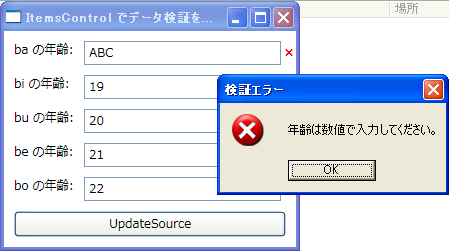
設定ダイアログなんかで、OK ボタンで一括チェックを行って反映、みたいなのを作る場合、個々の Binding に UpdateSourceTrigger="Explicit" を設定しておき、.NET Framework 3.5 から追加された BindingGroup で ValidationRule をまとめて走らせる実装をしてる。でも、ItemsControl の ItemTemplate で Binding を定義した場合、それらの Binding はそのままでは BindingGroup には入らないみたい。
BindingGroup が使えないなんて、項目ごとの BindingExpression を取得して更新するしかないの ? んなわけないよね ? と思って試行錯誤してみた結果、BindingGroup に Name プロパティを設定しておき、同時に更新したい Binding の BindingGroupName プロパティにその値を設定しておくと追加されることが分かった。
※ もちろん、同一のデータソースのものしか追加されないよ
一応、それなりの動作はするんだけど、なぜか最後の項目から順番に ValidationRule が走ってしまう。そんなもんだっけ ?
その他、気づいたこととか、メモとか。
というわけで、サンプル。
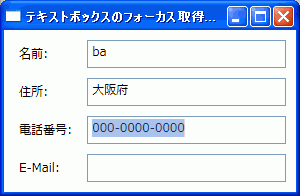
こうですか !? わかりません ! w
<Window x:Class="WpfSample.Window1"
        xmlns="http://schemas.microsoft.com/winfx/2006/xaml/presentation"
        xmlns:x="http://schemas.microsoft.com/winfx/2006/xaml"
        Title="テキストボックスのフォーカス取得時にテキストを選択する"
        SizeToContent="Height" Width="300"
        PreviewGotKeyboardFocus="Window_PreviewGotKeyboardFocus">
    <Window.Resources>
        <Style TargetType="Label">
            <Setter Property="Margin" Value="5"/>
            <Setter Property="ContentStringFormat" Value="{}{0}:"/>
        </Style>
        <Style TargetType="TextBox">
            <Setter Property="Margin" Value="5"/>
        </Style>
    </Window.Resources>
    <Grid Margin="5">
        <Grid.ColumnDefinitions>
            <ColumnDefinition Width="Auto"/>
            <ColumnDefinition/>
        </Grid.ColumnDefinitions>
        <Grid.RowDefinitions>
            <RowDefinition Height="Auto"/>
            <RowDefinition Height="Auto"/>
            <RowDefinition Height="Auto"/>
            <RowDefinition Height="Auto"/>
        </Grid.RowDefinitions>

        <Label Grid.Column="0" Grid.Row="0" Content="名前"/>
        <TextBox Grid.Column="1" Grid.Row="0"/>

        <Label Grid.Column="0" Grid.Row="1" Content="住所"/>
        <TextBox Grid.Column="1" Grid.Row="1"/>

        <Label Grid.Column="0" Grid.Row="2" Content="電話番号"/>
        <TextBox Grid.Column="1" Grid.Row="2"/>

        <Label Grid.Column="0" Grid.Row="3" Content="E-Mail"/>
        <TextBox Grid.Column="1" Grid.Row="3"/>
    </Grid>
</Window>
namespace WpfSample
{
    /// <summary>
    /// Window1.xaml の相互作用ロジック
    /// </summary>
    public partial class Window1 : Window
    {
        public Window1 ()
        {
            InitializeComponent ();
        }

        private void Window_PreviewGotKeyboardFocus (object sender, KeyboardFocusChangedEventArgs e)
        {
            var textBox = e.NewFocus as TextBox;
            if (textBox != null)
                textBox.SelectAll ();
        }
    }
}
単一のオブジェクトからシーケンスを作成したい場合ありますよね。引数にシーケンスを取る関数に渡すとか、単一オブジェクトもコレクションも同じ処理をしたいとか…。
なので、こんな拡張メソッドを作っとくと便利かも。Enumerable のメンバとしてほしいくらい !
namespace ExtensionMethods
{
    static class EnumerableExtension
    {
        public static IEnumerable<TSource> ToSequence<TSource> (this TSource source)
        {
            yield return source;
        }
    }

    class Person
    {
        static void Main (string [] args)
        {
            var person = new Person ();
            IEnumerable<Person> people = person.ToSequence ();
        }
    }
}
標準にないのかな…。
-------------
IEnumerable<Person> people = Enumerable.Repeat (person, 1);
ならありますね。
IPv4 でマルチキャストのパケットを送出する際、デフォルトのままでは TTL が 1 になってしまう。ルータ越えの必要がある場合は以下のようにして、送信に使用するソケットのオプションを変更する。(下記は TTL を 32 に変更した例)
// #include <Winsock2.h>
int ttl = 32;
int result = setsockopt (socket, IPPROTO_IP, IP_MULTICAST_TTL, (char *)&ttl, sizeof ttl);
if (SOCKET_ERROR == result)
{
    // エラー処理は省略...
}
C# の場合はこんなの。
// using System.Net.Sockets;
int ttl = 32;
socket.SetSocketOption (SocketOptionLevel.IP, SocketOptionName.MulticastTimeToLive, ttl);
フィードバック: RadioButton.IsCheckedProperty losing databindings
以下、例によって訳はヘナチョコなんで、信用しないように。
http://forums.microsoft.com/MSDN/ShowPost.aspx?PostID=1613789&SiteID=1
I'm currently fooling around with databinding in the wpf framework and I'm stumped as to why my bindings to the RadioButton.IsCheckedProperty are being removed. My goal is to create a yes no groupbox where the group box contains 2 radio buttons. The radio buttons would have their IsChecked property bound to the same property (In my example, both radiobuttons are bound the the "CurrentValue" property of the same datasource.).
私は現在、wpf フレームワークのデータバインディングをいじくってて、RadioButton.IsCheckedProperty へ設定したバインディングがなぜ削除されてしまうのかについて途方にくれています。私の目的は yes no のグループボックスを作ることで、グループボックスには 2 つのラジオボタンを含みます。そのラジオボタンはそれぞれの IsChecked プロパティを同一のプロパティにバインドしたいです。(私の例では、両方のラジオボタンを同じデータソースの "CurrentValue" プロパティにバインドします。)
Microsoft からコメントついてる。
Thank you for your feedback. We are currently investigating. If this issue is urgent, please call support directly (see http://support.microsoft.com). Thank you, Visual Studio Product Team.
投稿者: Microsoft、投稿日時: 2007/05/26 18:11
フィードバックありがとう。我々は現在調査しています。もし問題が緊急なら、サポートに直接電話してください(http://support.microsoft.com 参照) ありがとう、Visual Studio Product Team より。
Thanks for your feedback. We have reproduced this bug on Win2003 SP2 and OrcasBeta1VSTS, and we are sending this bug to the appropriate group within the Visual Studio Product Team for triage and resolution. Thank you, Visual Studio Product Team.
投稿者: Microsoft、投稿日時: 2007/05/26 18:12
フィードバックありがとう。このバグを、Windows 2003 SP2 と OrcasBeta1VSTS 上で再現させ、順位付けと解決のために、このバグを Visual Studio Product Team 内部の適切なグループに送っています。ありがとう、Visual Studio Product Team より。